Have you ever found a song that feels just a little too high or too low to sing comfortably? I know the feeling. Sometimes moving a song down just one semitone makes all the difference, especially when the chorus has that one note you have to fight to reach.
That’s why we’ve added a free Key Changer at Superbackings. It lets you change the pitch without changing tempo, so you can find a better key for your voice while keeping the song at its original speed.
How to Change the Pitch Without Changing Tempo
Changing a song’s pitch is not the same as slowing it down. If you reduce playback speed, the music becomes slower and the notes go lower together. A pitch shifter changes the notes while keeping the beat and timing where they were.
That matters when you’re rehearsing for a performance. You want the accompaniment to stay at the familiar tempo, even when you decide that the original key doesn’t suit your voice.
Choose an MP3 from your device. The tool accepts MP3 files up to 10 MB.
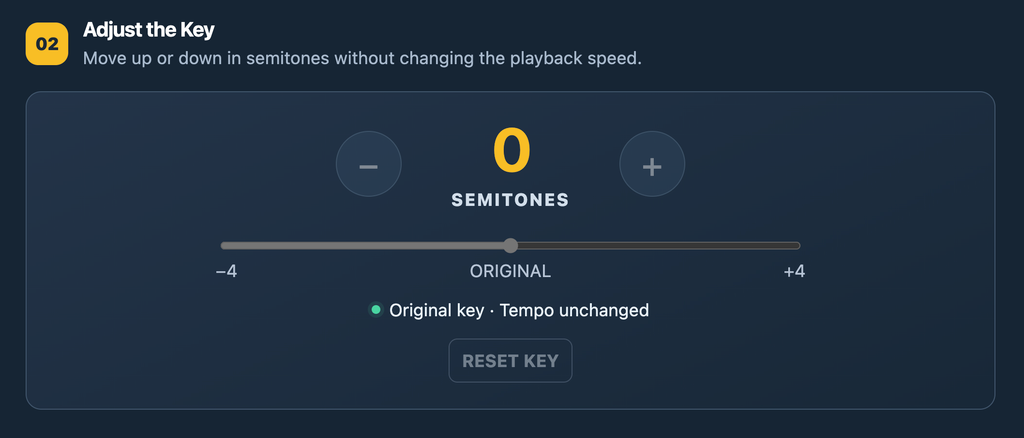
Press Play and adjust the key. Start at 0 for the original pitch. Try −1 or −2 to sing lower, or +1 or +2 to sing higher. The free tool allows adjustments up to four semitones in either direction.
Listen to the entire song. Try the verses and, most importantly, the highest notes in the chorus. You can change the key as you listen without changing the tempo.
Download your adjusted MP3. Once you’ve found a key you like, export the new version.
Choose the number of semitones and listen right away.
How Many Semitones Should You Change?
My advice as a singer is to begin with small changes. One semitone might be enough. If the chorus still feels strained, try two. Don’t judge the key only by the first verse: sing the most demanding part of the song before deciding.
Also, keep in mind that larger pitch changes can affect the sound of an existing recording. For a quick rehearsal or to test an idea, pitch shifting is extremely useful. When you need a track arranged specifically for your voice, a custom backing track may be the better option.
Try It with Your Next Song
Whether you’re preparing for a live show, practicing at home, or checking which key works best before recording, give it a try. It’s free, and you don’t have to install audio software.
Have you ever found the perfect song to sing, only to realize that the chorus sits just a little too high? Or that the lowest notes almost disappear when you try to sing them comfortably?
That’s one of the most common problems singers run into. A song can be wonderful, the arrangement can be exactly what you need, but the original key doesn’t always work for your voice. You shouldn’t have to force the high notes or lose the character of the song just to stay in the same key as the original artist.
That’s why I’m happy to introduce Superbackings Audio Lab, a free online pitch shifter included with eligible individual backing tracks purchased at Superbackings.com. It gives singers a practical way to change a song’s key, listen to the result and prepare a version that feels more natural to perform.
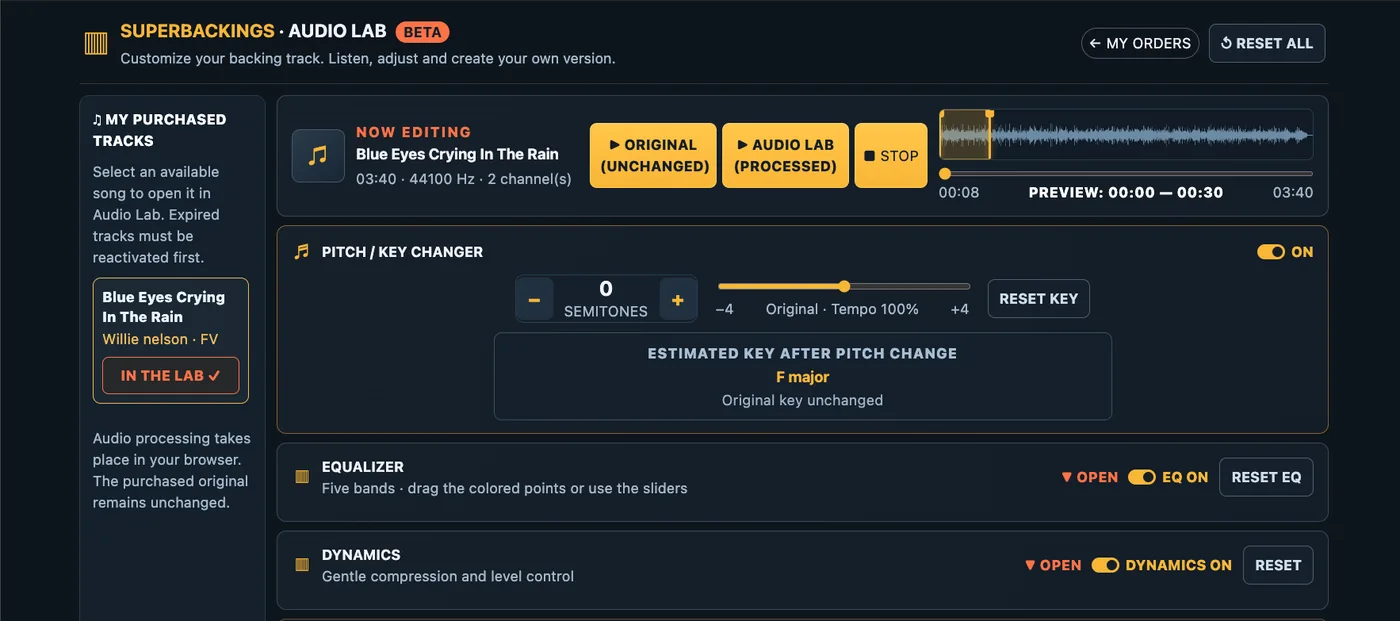
Superbackings Audio Lab: adjust the key of your backing track directly in your browser.
Why changing the key can make you a better singer
As a singer and music producer, I’ve learned that the right key can change everything about a performance. Sometimes the difference between struggling through a chorus and singing it with confidence is just one or two semitones.
Think about the last song you rehearsed. Did you feel relaxed in the verses but tense when you reached the chorus? Did you have to push for a high note, or did the low notes lose their strength? Those are useful clues that the song might be sitting outside your most comfortable range.
Changing the key isn’t taking a shortcut. Professional singers do it all the time. The goal is to find a place where the melody works with your voice, so you can concentrate on phrasing, expression and connecting with the audience.
Meet Superbackings Audio Lab: a free online pitch shifter
Audio Lab is built into the Superbackings experience. Once your purchased track is available in your account, you can open it in Audio Lab and experiment with its key without needing to install audio-editing software.
With the pitch controls, you can move the music up or down by as much as four semitones in either direction, one semitone at a time. The tempo stays the same, so a ballad doesn’t suddenly become faster just because you’ve raised its key.
For example, if a song in C major is too high, moving it down two semitones places it in B-flat major. You can hear that difference for yourself before deciding what works best.
Try a slightly higher or lower key while keeping the original song tempo.
Compare your changes before choosing a key
One of my favorite ways to approach a new song is to sing the hardest part first. Usually that’s the chorus, a sustained note or the transition from chest voice into a higher register. Audio Lab lets you choose a listening section and compare the original with the processed sound, making it easier to decide whether the new key is helping.
How to find the right singing key: a simple rehearsal method
You don’t need to know music theory to make a good decision. Try this approach:
Start with the original key. Sing the chorus, not just the first verse. Notice where your voice feels strained or unusually low.
Move one semitone at a time. If the chorus feels too high, try -1 and then -2. If the melody sits too low, try +1.
Sing the entire range. A lower chorus might feel great, but check that the verses haven’t become too low.
Listen to your tone, not just whether you can hit the note. The best key is often the one where you can sing with control and expression, without pushing.
Rehearse your chosen key a few times. Once it feels comfortable, export the version you’ll use for practice or performance.
Here’s a useful tip: if you’re preparing for a live show, try singing your chosen key at the end of a normal rehearsal, when your voice is a little tired. A key that only works when you’re completely fresh may not be your best choice for a long set.
More than a pitch shifter: shape the sound of your backing track
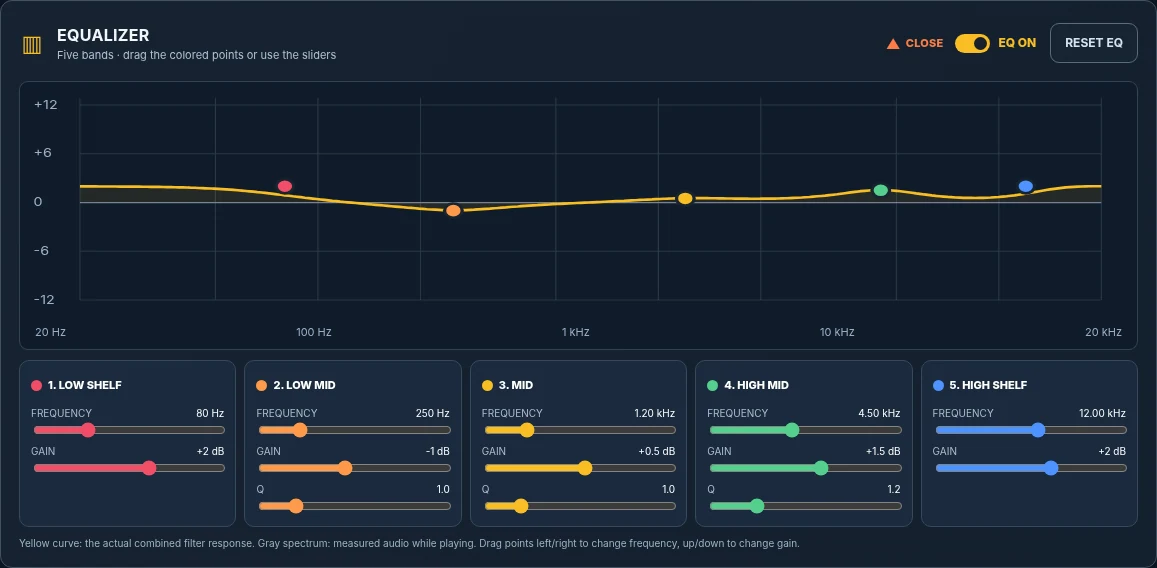
Audio Lab also includes a five-band equalizer and dynamics controls. These aren’t a replacement for a professional mix, but they can be helpful when you’re preparing music for a particular rehearsal space, sound system or playback setup.
Use the equalizer to fine-tune the sound
If the track sounds a little muddy on your speakers, a careful adjustment to the low-mid frequencies may help. If it feels too bright, you can gently reduce some of the higher frequencies. Small changes are usually more useful than dramatic ones.
The five-band EQ gives you additional control over the tonal balance of your music.
Prepare a version for rehearsal or performance
You can also explore gentle compression and output-level adjustments, compare the processed track with the original, and export your finished version as WAV or MP3. The original purchased backing track stays unchanged.
When you’re happy with your adjustments, export your customized backing track.
Where to get backing tracks to use with Audio Lab
At Superbackings.com, you’ll find a large catalog of professionally produced backing tracks covering different artists, styles and songs. Browse the catalog, purchase an individual backing track and, once it’s available in your account, open an eligible purchase in Audio Lab at no additional charge.
For singers, that means you can choose the song you want and then make practical adjustments to suit your own voice. Whether you’re getting ready for an audition, working on your repertoire or rehearsing for the weekend’s show, having the right key makes preparation much easier.
Try the free online pitch shifter for your next song
I’ve always believed that a good backing track should support the singer, not the other way around. Audio Lab is one more way to make the music work for you.
I’ve been working in the music business, recording, and music production for more than 30 years. Over the course of my career, I’ve worked with every major recording technology, from reel-to-reel tape, ADAT, and Portastudios to the modern computer-based studio. I’ve adapted to every technological change along the way, and I understand sound not only from a theoretical perspective, but through decades of hands-on experience that have shaped and enriched my work. Are you looking for professional backing tracks? Search no more! Get a quote now.
I’ve been creating professional backing tracks since 2001. I’ve worked with some of the largest karaoke companies in the world, including Pocket Songs, HomeStar karaoke, Karaoke Version, Sunfly Karaoke, and many others. I’ve produced countless songs that you may be singing today, even if you purchased them from another source.
I’m not only a producer and sound engineer; I’m also a singer, so I understand what it’s like to be on the other side of the microphone. I’ve performed in pubs, parties, and bars, and I’ve worked as a vocalist at numerous events. I’m telling you this so you can understand what sets me apart as a producer of professional backing tracks. I’m not just someone sitting behind a computer. I’m a professional producer with decades of experience, a proven track record, and a portfolio of more than 25,000 backing tracks recorded throughout my career.
Some people don’t realize the difference between hiring an experienced professional and working with someone who is just starting out. You’ll hear that difference in the sound of your live performance, your album, or your YouTube channel, and your audience will hear it too.
If you’re looking for professional backing tracks, don’t hesitate to get in touch. I’ll work closely with you and provide as many revisions as you need to make sure the final product sounds exactly the way you want it to.
I’ve had the privilege of recreating songs by an artist I wasn’t previously familiar with. I was amazed the first time I heard him, and as I gradually explored his repertoire, I realized I was dealing with a truly great composer and singer-songwriter: Udo Jürgens.
I’ve had the opportunity to create Udo Jürgens backing tracks for some of my clients in Switzerland and Germany, and I must admit I was captivated. Living in America, I had never heard of Udo Jürgens before, which is understandable, but now I’ve not only had the chance to work with great artists who pay tribute to him in their shows, but I’ve also learned a tremendous amount from his music, his songs, and his chord progressions.
Would you like to hear some of the Udo Jürgens songs I’ve recorded for my clients? Visit the link below.
I hope you enjoy them. You can download these tracks to your computer and enjoy them whether in your own shows, during live performances, or anywhere else you like.
I frequently hear from theater and choral companies looking to create productions for their schools; even dance schools contact me for a high quality backing tracks. However, the last song I was asked to work on took me by pleasant surprise. This week, I worked on a production that I enjoyed so much I decided to write a post about it, it is called Adiemus backing track.
I was commissioned to create a version of the song “Adiemus” for a prominent choir. What surprised the most was discovering, when I went to listen to the lyrics, that the song was composed entirely of words from a non existent language; the composer clearly chose the music above the words, and I was truly captivated.
Adiemus backing track
Working on this production for the choir brought me the kind of joy that only comes from doing what you love. I invite you to take a listen to the adiemus backing track I produced.
If you are interested in a choral music production, or if you run a theater company and want to take your show’s sound to the next level, get in touch with me and let’s talk. Together, we can create a production of your own.