Many musicians, singers, and producers often ask me how to remove instruments from a song without damaging the quality of the original track. The truth is, removing instruments is not as simple as pressing a button, it requires the right tools, experience, and a detailed mixing process. Let me share a recent example that illustrates how I handle these projects.
The Challenge: Removing the Saxophone from the song
A customer recently asked me to remove the saxophone from a few original songs he sent me. He wanted clean versions to use as backing tracks. At first glance, it looked like a straightforward job, use Artificial Intelligence (AI) to separate the instruments and mute the sax.
But here’s the problem: when using AI, the software doesn’t just remove the instrument, it also removes part of the reverb and harmonics of the other instruments. This made the songs sound dry, unbalanced, and far from professional. Simply removing the instrument was not enough to make them sound fantastic.
The Solution: Mixing from the Ground Up
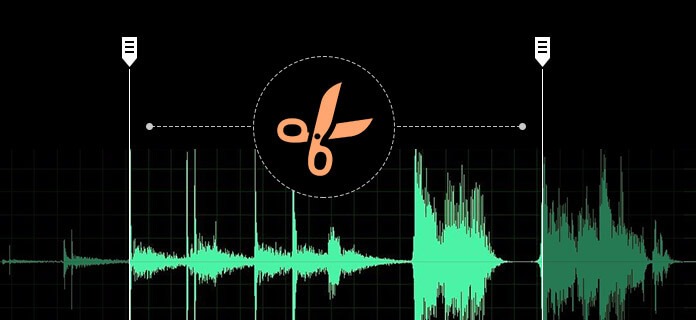
To achieve a professional result, I went further. I opened the stems (separated audio files) of the original song in my DAW (Digital Audio Workstation) and worked on each track individually.
Here’s what I did step by step:
Rebalanced each instrument to make sure the mix was even.
Restored harmonics and reverb that were lost during the AI removal process.
Applied EQ and compression to give clarity and depth.
Cleaned up unwanted noises and fixed minor sound issues.
Delivered a polished, professional mix that was ready to be used as a backing track.
The Result
By combining AI separation with professional mixing techniques, I was able to remove the saxophone while keeping the richness of the original song intact. The customer was very satisfied with the final product, it wasn’t just a track with the sax muted, it was a professional quality backing track that sounded natural and well-produced.
Final Thoughts
If you’re wondering how to remove instruments from a song, the answer is that AI tools alone are not enough. They are a great starting point, but achieving a high-quality result requires human expertise in audio mixing and production. Every song is unique, and sometimes restoring what the AI takes away is just as important as removing the instrument itself.
Some customers prefer this method instead of making the song from scratch because it’s cheaper. I just want to be clear: removing an instrument has no comparison with the real thing, which is recording everything from scratch. However, I completely understand that when it’s just for fun or practice purposes, this solution can be a great option.
If you’d like me to create a custom backing track from scratch or remove instruments from your favorite song, feel free to get in touch or visit my download store.
People often ask how much it cost making a custom backing track. It’s a fair question! But the price isn’t just about “getting an audio file.” You’re investing in years of skill, a finely tuned ear, professional equipment, and the time it takes to shape a track that’s truly yours. Below I’ll walk you through what goes into every project so you can understand the value behind the music.
It’s not just a product — it’s a craft
Every custom track is a mini-production: research, arranging, recording, editing, mixing, and mastering. That process is powered by seven pillars of expertise and investment.
1) Knowing all styles and genres (authenticity over “generic”)
Great backing tracks sound like the real thing. That means understanding the language of each genre:
Rock needs tight drums, crunchy guitars, and punchy bass.
Funk lives in the pocket syncopation, ghost notes, and groove.
Jazz calls for tasteful voicings, swing feel, and dynamics.
Latin, EDM, Pop, Gospel, Metal, Orchestral each has its own arrangement rules, sound palette, and performance nuances.
Genre fluency ensures your track feels authentic, not like a one size-fits-all template. That research and stylistic accuracy takes time, and it’s a big part of what you’re paying for.
2) Deep harmony knowledge (why every chord matters)
Harmony is the architecture of the song. Knowing diatonic and modal harmony, secondary dominants, borrowed chords, modulations, and voice-leading lets me:
Rebuild complex progressions accurately.
Choose voicings that support the melody.
Arrange parts so instruments fit together instead of fighting for space.
This is how your track feels rich, musical, and emotionally right whether it’s a simple four-chord groove or a dense orchestral progression.
3) The gift of listening and replicating (ear training + feel)
Replicating a reference isn’t just about the notes. It’s about:
A trained ear catches those tiny details that make your track sit right next to the original in energy and character. That ear isn’t an overnight skill—it’s cultivated over thousands of hours.
4) Professional equipment (the invisible investment)
Behind a clean, professional sound is a studio’s worth of gear:
Re-amping & signal flow (capturing DI, then shaping tone afterward).
Session organization (naming, color coding, bussing, gain staging).
Backup & versioning (so nothing gets lost and revisions are smooth).
Tech fluency keeps your project efficient and lets creativity move fast without sacrificing quality.
6) Premium plugins & virtual instruments (the modern sound palette)
Pro results rely on pro tools: compressors, EQs, reverbs, limiters, saturators, mastering suites, drum libraries, orchestral libraries, amp sims, synths, and specialty FX. These aren’t free, and keeping them updated and legit is part of professional standards.
Why it matters: Better tools mean cleaner mixes, more realistic instruments, and competitive loudness without distortion.
Your benefit: A track that can stand next to major releases in sheen and impact.
7) 25+ years of mixing & mastering experience
Experience is the difference between “pretty good” and “wow.” After a decade or more, you learn to:
Balance frequencies so vocals and instruments don’t mask each other.
Control dynamics so the track feels powerful but never harsh.
Make mixes that translate on phones, laptops, big speakers, and PAs.
Master tracks to consistent loudness while preserving punch and clarity.
This is where your song goes from a pile of sounds to a polished, inspiring performance bed.
You might wonder if ordering several songs lowers the price per track. Sometimes there’s room to streamline (shared templates, similar instrumentation), but ultimately you’re not buying something that’s already made “files”, you’re investing in time, skill, and a bespoke process for each song. Quality takes focused hours, and that’s what ensures your music sounds right every time.
What actually affects the quote
If you’re trying to estimate how much does it cost to make a custom backing track for your project, here are the biggest variables:
Song complexity & length (simple groove vs. intricate arrangement).
Instrumentation (live guitars/bass vs. full orchestration & sound design).
Vocal guides or backing vocals (if needed).
Turnaround time (rush deliveries require extra hours).
Number of revisions (I include fair revisions to get it perfect).
Stems on request for live mixing and extra flexibility.
Consistent naming & organization for easy use in your sessions.
Friendly communication to make sure the track matches your vision.
So, how much does it cost to make a custom backing track?
Every project is unique. Share a few details (style, references, key/tempo if known, length, deadline), and I’ll give you a clear, personalized quote.
Ready to talk about your project?
If you’re asking how much does it cost to make a custom backing track for your specific song, the best next step is simple: tell me what you need and I’ll tailor a quote to match the scope, timeline, and deliverables, no surprises, just great music.
If you’ve ever wondered how to record your vocalsover your favorite backing tracks. With the right tools, software, and a bit of practice, you can achieve clear, studio quality recordings at home. While you can record at home with some basic gear, remember that for truly professional results, nothing beats working with an experienced studio. But here are some essential tips to help you start practicing.
1. What You’ll Need (Hardware)
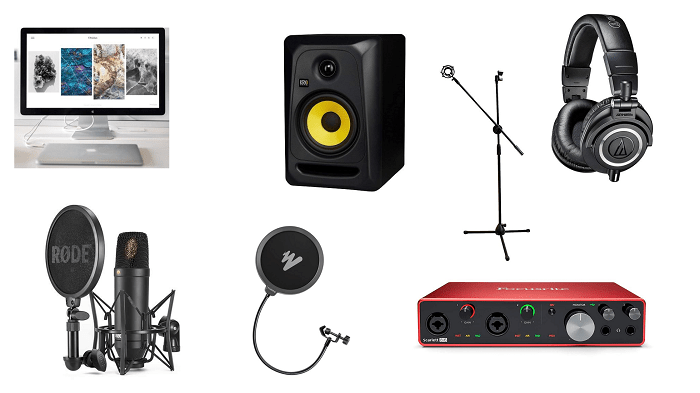
Microphone: A condenser microphone is ideal for capturing rich detail. However, if you already have a dynamic mic, it will work fine too. Like anything else, you can find gear that’s pricey and gear that’s affordable, it really just comes down to your budget.
Computer: Either Mac or Windows will do. (Personally, I prefer Mac for its stability with audio software.)
Audio Interface: This device connects your microphone to the computer, sending clean, raw vocals into your recording software.
Pop Filter: A simple but powerful tool to stop sibilance, pops, and saliva, protecting your microphone and keeping your recordings smooth.
Studio Monitors (Flat Speakers): Professional studio speakers will help you accurately hear and mix your vocals later.
2. What You’ll Need (Software)
DAW (Digital Audio Workstation): This is where you’ll record, edit, and mix your vocals.
For Mac: Logic Pro is an excellent choice.
For Windows: LUNA or Studio One are reliable and beginner-friendly.
Plugins: At minimum, you’ll want:
One or two compressors (for controlling volume dynamics)
A reverb plugin (to add natural space to your voice)
A delay plugin (for extra creative depth)
There are so many plugins out there that it’s easy to get carried away, start with just a few good ones and choose wisely Would you like me to write a post about suggested plugins? Write me and let me know.
3. The Most Important Ingredient: Practice
No gear or plugin can replace consistent practice. Spend time experimenting with mic placement, vocal performance, and mixing techniques. The more you practice, the better your recordings will sound.
Ready to Start?
Now that you know how to record your vocals, all you need is great music to sing over. Download high-quality backing tracks from superbackings.com and start recording today!
If you’re searching how to remove vocals with AI, you probably want a clean, professional instrumental that feels like the original just without the lead voice. That’s exactly what I deliver by re‑recording the song from scratch instead of trying to subtract the singer with software.
Why re‑recording songs vs Remove vocals using AI tech
To be honest, even the best “vocal remover” AI software leave artifacts like phasiness, cymbal smear, melody ghosts, or missing bass. When you need a track that’s stage or studio ready, there’s a better path: rebuild the arrangement with high‑end virtual instruments, real guitars/bass as needed, and meticulous mixing/mastering to match the reference.
How to remove vocals, the problem of using AI
It can’t perfectly separate overlapping frequencies (voice and instruments share space).
Ambience, reverb tails, and harmonies often survive the “removal.”
You lose punch and clarity—especially in drums and high‑end detail.
Singer‑ready mix: An instrumental with headroom, plus a click and count‑in if you want.
Flexible keys/structure: Change key, cut/extend sections, add an outro or a dance break.
Consistent quality: No artifacts, no watery cymbals, no “karaoke‑machine” sound.
Before you try another app that teaches you how to remove vocals, consider a pro studio remake. You’ll get the fidelity you expect—and the freedom to tailor the track to your performance.
My process (fast and precise)
Reference: You send a YouTube link or MP3 and any notes (key, tempo change, edits).
Arrangement: I map structure, chords, and instrumentation bar by bar.
Sound design: I choose matching patches/amps, and record real instruments where needed.
Mix & master: Punchy, balanced instrumental with mastering that mirrors the original loudness/feel.
Delivery: WAV/MP3 instrumental, stems, click track, and performance ready versions.
Ideal for
Live shows, auditions, and theater productions.
Singers who need the original feel without the original vocal.
Content creators who want a clean, claim safe instrumental recreation.
What you’ll receive
High‑resolution stereo instrumental (44.1–48 kHz, 24‑bit) + MP3 reference.
Project notes (tempo map, key, markers) on request.
FAQs
Can you exactly match the original sound? As close as legally and technically possible I meticulously mirror the arrangement, sound palette, and dynamics so it feels the same.
Is this legal? I create a sound‑alike instrumental (a cover recording). You’re responsible for any licenses needed for public use, broadcast, or distribution.
Can you change key or structure? Absolutely yes! modulations, shortened intros, extended outros, or dance breaks are all common.
Do you deliver stems? Yes. Stems make rehearsals and live mixing much easier.
Ready to stop Googling how to remove vocals and get a flawless track? Tell me the song, and I’ll build your custom backing track from the ground up.
Have you used artificial intelligence to compose a song, only to realize you can’t remove the vocals from it? This is a common problem with AI generated music: the tracks sound fine, but they come as a single mixed file, making it impossible to get a clean instrumental version. If you’re a singer, producer, or studio musician who needs a professional backing track, I can help, I’ll tell you the proper way to remove vocals from AI.
Are you trying to remove vocals with AI also?
Trying to remove vocals from an AI composition with automated tools usually leaves distortion or missing frequencies. By rebuilding the track completely, I can give you a result that sounds like it came from a professional studio session. With separate stems, you’ll also have maximum flexibility to adjust levels or add effects later.
When you generate a track with artificial intelligence it often comes as a single stereo mix, which makes it impossible to separate vocals cleanly without affecting the sound of the entire track. If your goal is to perform, record vocals, or release the song commercially, you need more than software tricks you need a full instrumental reconstruction.
What I deliver
Instead of using filters, I manually re-record your AI track from scratch. This ensures perfect sound quality and full control over every instrument. If you hire me to remove vocals from an AI composition, you’ll receive:
A fully recorded and mixed instrumental version of your song.
Individual stems for every instrument (drums, bass, guitars, keyboards, etc.).
A mastered track ready for performance, vocal recording, or release.
I can also mix your vocals into the song.
Start now
Send me your AI generated song and I’ll handle everything: re recording, mixing, and mastering. You’ll receive a clean track and all the individual stems so you can take it to your favorite studio and record with confidence. Contact me today to remove vocals from AI composed song and get a professional result.
Are you looking for Broadway backing tracks that sound professional, authentic, and tailored exactly to your needs? Whether you’re preparing for a stage performance, teaching a group of aspiring performers, or running an art and dance academy, having high quality music makes all the difference.
I specialize in creating and replicating any song completely from scratch. Unlike generic karaoke versions, my Broadway backing tracks are carefully arranged, recorded, and mixed to match the original production, or to give it a brand new twist if you’re looking for something unique.
Authentic sound: Faithful to the original Broadway arrangements with full instrumentation.
Creative flexibility: Need the same song in another style or tempo? I can make an entire alternate version just for you.
Perfect for schools and academies: If you’re a theater program, art dance school, or vocal coach, I provide reliable tracks for live shows, recitals, and student performances.
Ready to use: Delivered as high-quality audio files, fully mixed and mastered for stage or studio.
Why choose custom tracks instead of pre made ones?
When you choose custom Broadway backing tracks, you’re not limited to the versions you find online. You get music that fits your exact vision, whether it’s for a full-scale musical, a solo performance, or a creative re-imagining of a classic show tune.
If you’re producing a musical, training performers, or need fresh arrangements for your next recital, I can help. From big ensemble numbers to intimate solos, I’ll make sure your Broadway music is performance-ready.
From Sweet Charity to Beetlejuice – Custom Backing Tracks for Any Style
Did you know that Broadway songs can be completely re imagined to fit your performance? Recently, a UK dance academy contacted me with an exciting challenge: they needed a number from Sweet Charity, but not in its classic style. They wanted it transformed into something different, more playful, something straight out of Beetlejuice.
This is exactly what I love to do. I create custom backing tracks from scratch, and that means I’m not limited to copying the original version. I can rearrange the entire song, change its feel, its groove, even its orchestration, all while keeping it performance-ready for the stage.
What instruments and sounds gave it that quirky “Beetlejuice” energy.
Why custom Broadway backing tracks give theater schools and dance academies total creative freedom.
If you’re curious about how a classic Broadway hit can be transformed into a totally new experience, read the full story here →
Whether you need an authentic reproduction of a show tune or a bold re imagined version for your production, I can create Broadway backing tracks that fit your exact vision.
Looking for the perfect Broadway backing tracks?Contact me today. or if you want to browse my already made ones click here and search on superbackings.